Karate API Testing - Step by Step guide.
- akshay thakre
- Apr 22, 2021
- 3 min read

Updated: Apr 26, 2021

This post explains on how to build the karate framework and start with API Testing.
For that we should configure Java and Maven in our systems first and after that it can be completed with below 5 steps.
Create the Maven Project.
Add the Maven Dependencies.
Write the feature file and Runner Class.
Reports.
Logging if required. ( To be added soon )
Create a Maven Project.
1. Create a Maven Project.

2. Add the maven Depencies to the pom.xml
First Foremost Dependency to be added should be.
2.1 : Karate inituit Dependency
<!-- https://mvnrepository.com/artifact/com.intuit.karate/karate-apache -->
<dependency>
    <groupId>com.intuit.karate</groupId>
    <artifactId>karate-apache</artifactId>
    <version>0.9.6</version>
    <scope>test</scope>
</dependency>
2.2 : Karate junit Dependency
<!-- https://mvnrepository.com/artifact/com.intuit.karate/karate-junit4 -->
<dependency>
    <groupId>com.intuit.karate</groupId>
    <artifactId>karate-junit4</artifactId>
    <version>0.9.6</version>
    <scope>test</scope>
</dependency>
2.3 : Cucumber Reporting For Reports Dependency and Extent Reports
This dependency is for producing cucumber reports which is pleasing to eye as compared to the karate reports which are created by deffault.
<!-- https://mvnrepository.com/artifact/com.aventstack/extentreports -->
<dependency>
    <groupId>com.aventstack</groupId>
    <artifactId>extentreports</artifactId>
    <version>5.0.4</version>
</dependency>

<!-- https://mvnrepository.com/artifact/com.vimalselvam/cucumber-extentsreport -->
<dependency>
    <groupId>com.vimalselvam</groupId>
    <artifactId>cucumber-extentsreport</artifactId>
    <version>3.1.0</version>
</dependency>

<!-- https://mvnrepository.com/artifact/net.masterthought/cucumber-reporting -->
<dependency>
    <groupId>net.masterthought</groupId>
    <artifactId>cucumber-reporting</artifactId>
    <version>3.8.0</version>
</dependency>
2.4 Cucumber Junit and junit Dependency
<!-- https://mvnrepository.com/artifact/info.cukes/cucumber-junit -->
<dependency>
    <groupId>info.cukes</groupId>
    <artifactId>cucumber-junit</artifactId>
    <version>1.2.5</version>
    <scope>test</scope>
</dependency>

<!-- https://mvnrepository.com/artifact/junit/junit -->
<dependency>
    <groupId>junit</groupId>
    <artifactId>junit</artifactId>
    <version>4.11</version>
    <scope>test</scope>
</dependency>
2.5 Json path dependency
<!-- https://mvnrepository.com/artifact/com.jayway.jsonpath/json-path -->
<dependency>
    <groupId>com.jayway.jsonpath</groupId>
    <artifactId>json-path</artifactId>
    <version>2.4.0</version>
</dependency>
3. Write the feature file and Runner Class.
3.1 Feature file can be created under FeatureFile directory package under java as shown in the screenshot below.

3.2 Write Runner Class. We can write 2 different runner classes by creating runner package under java.
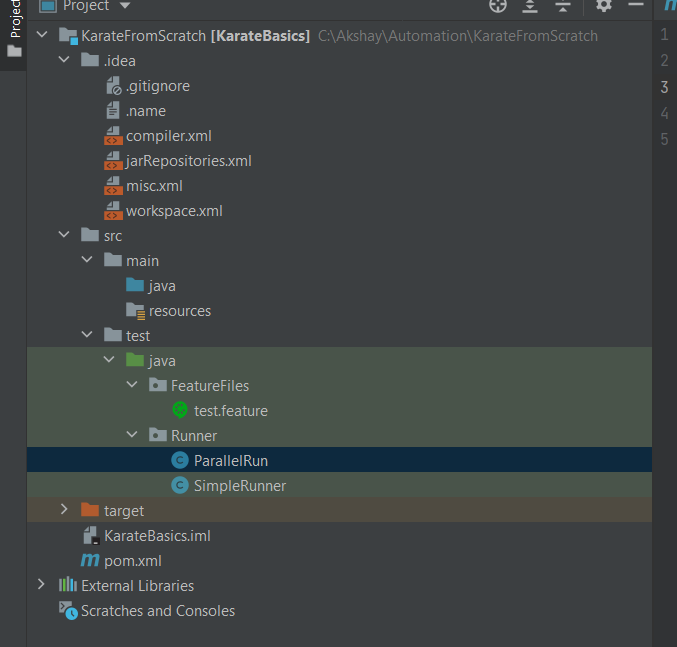
3.3 Define a Simple Runner Class
The code to be written in SimpleRunner class is mentioned below in screenshot and snippet.

package Runner;

import com.intuit.karate.KarateOptions;
import com.intuit.karate.junit4.Karate;
import org.junit.runner.RunWith;

@RunWith(Karate.class)
@KarateOptions(
        features = "src/test/java/FeatureFiles/test.feature",
        tags = {"@test1"}
)

public class SimpleRunner {
}
3.4 Define a Parallel Runner Class
The code to be written in ParallelRun class is mentioned below in screenshot and snippet.
Configuration class for masterthought cucumber reporting needs to be used.3.4 Define a Parallel Runner Class

package Runner;
import com.intuit.karate.KarateOptions;
import com.intuit.karate.Results;
import com.intuit.karate.Runner;
import net.masterthought.cucumber.Configuration;
import net.masterthought.cucumber.ReportBuilder;
import org.apache.commons.io.FileUtils;
import org.junit.Test;
import java.io.File;
import java.util.ArrayList;
import java.util.Collection;
import java.util.List;

import static org.junit.Assert.assertTrue;

@KarateOptions(
        features = "src/test/java/FeatureFiles/test.feature",
        tags = {"@test1"}
)

public class ParallelRun {

    @Test
    public void testParallel(){
        System.setProperty("mock.env","karateTesting"); // ensure reset if other tests
        Results results = Runner.parallel(getClass(),5);
        ParallelRun.generateReport(results.getReportDir());
        assertTrue(results.getErrorMessages(),results.getFailCount()==0);
    }

    public static void generateReport(String karateOutputPath) {
        Collection<File> jsonFiles = FileUtils.listFiles(new File(karateOutputPath), new String[]{"json"}, true);
        List<String> jsonPaths = new ArrayList<>(jsonFiles.size());
        jsonFiles.forEach(file -> jsonPaths.add(file.getAbsolutePath()));
        Configuration config = new Configuration(new File("target"), projectname: "demo");
        ReportBuilder reportBuilder = new ReportBuilder(jsonPaths, config);
        reportBuilder.generateReports();

    }
}
4.1 Writing a feature file and running runner class to generate reports
This is the simplest and easiest but needs most attention as the tags we provide will control which tests are run.
Just right click FeatureFiles package -> create a new file -> give a name and save as test.feature.
The screenshot mentions the way file is written.

3. This can be now tested by a simple right click on SimpleRunner / Parallel and running it.
4. Once this is run the tests will run and report will be created. Both the test run and report will look like below.
Reports and logs with ParellelRun:


Folder where reports will be generated.

Report with SimpleRunner:

Folder where simple runner report wll get generated.

5. Logging : How to log the steps that are running when we click on runner.
This step is important if we have to find out where the test case is failing and at which steps. Based on one particular file called logback we can actually control the level of logs at which we want to provide the details. For this we need to add a file called logback-test.xml in the src/test/java folder. The contents of the file are as below.

<?xml version="1.0" encoding="UTF-8"?><configuration><appender name="STDOUT" class="ch.qos.logback.core.ConsoleAppender"><encoder><pattern>%d{HH:mm:ss.SSS} [%thread] %-5level %logger{36} - %msg%n</pattern></encoder></appender><appender name="FILE" class="ch.qos.logback.core.FileAppender"><file>target/karate.log</file><encoder><pattern>%d{HH:mm:ss.SSS} [%thread] %-5level %logger{36} - %msg%n</pattern></encoder></appender><logger name="com.intuit.karate" level="DEBUG"/><root level="info"><appender-ref ref="STDOUT" /><appender-ref ref="FILE" /></root></configuration>Once you add this file as logback-test.xml in the classpath folder ( src/test/java/resources ) and then run the test cases then a karate.log file will be generated in target folder and the console output will be a without the verbose logs. ( If the logback-test.xlm is having level = DEBUG specified within it.
To avoid all this hassel and create one shot karate framework directory struncture install Maven and Java and run this command. Its a Maven qiick start template
mvn archetype:generate \
-DarchetypeGroupId=com.intuit.karate \
-DarchetypeArtifactId=karate-archetype \
-DarchetypeVersion=1.0.1 \
-DgroupId=com.mycompany \
-DartifactId=myproject
This will do almost the entire framework and we will need to just write feature files.
Comments